


In the fast-paced world of cybersecurity and technical auditing, the ability to rapidly dissect a website’s infrastructure is a vital asset. The Website Intelligence Analyzer on Apify offers a comprehensive solution for professionals seeking to extract detailed security and server information with minimal effort. By simply inputting a URL—or leveraging the bulk edit feature for large-scale analysis—users can gain immediate visibility into a site’s technical soul.
From identifying DNS records and server headers to detecting active firewalls and scanning for potential malware, this tool automates the heavy lifting of data collection. With results delivered in minutes and the flexibility to export data into JSON or CSV formats, it is perfectly suited for modern workflows. Furthermore, its native API support and compatibility with automation platforms like Make.com and n8n ensure that high-level website intelligence can be seamlessly integrated into any proprietary system or monitoring stack.
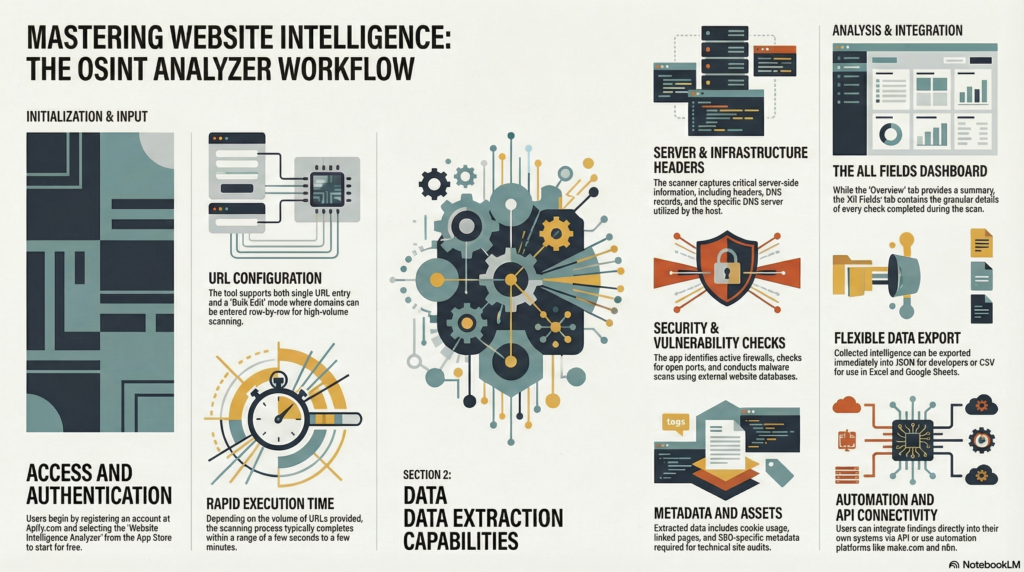
1. Introduction to Website Intelligence Analyzer
The Website Intelligence Analyzer, developed by the One Scales team, is a powerful Open Source Intelligence (OSINT) tool hosted on the Apify platform. OSINT refers to the collection and analysis of data gathered from open sources to produce actionable intelligence. This application automates the extraction of critical security, server, and SEO metadata from any web domain. Whether you are performing a security audit, competitive SEO analysis, or infrastructure research, this tool provides a centralized solution for scanning single or multiple URLs with precision and speed.
2. Prerequisites and Setup
Before initiating your first scan, ensure you have an active internet connection and an account on the Apify platform.
- Register an Account: Navigate to apify.com and complete the registration process.
- Locate the Tool: Open the Apify App Store and search for “Website Intelligence Analyzer.”
- Initiate the Application: Click the Try for free button to add the analyzer to your workspace and access the configuration console.
3. Configuring Input and URL Scanning
Manage all scan configurations within the Input tab. The tool is designed to handle both targeted single-site lookups and high-volume batch processing.
Single Input
For targeted analysis, manually enter URLs one by one into the input field. This is the default mode for checking individual domains or small sets of specific addresses.
Bulk Edit Feature
To process high-volume lists efficiently, use the Bulk Edit functionality:
- Toggle the Bulk Edit mode within the input interface.
- Specify your target domains or URLs row-by-row (one URL per line).
- This method bypasses the need for manual entry and is optimized for scanning extensive datasets.
Initiating the Scan
Once you have defined your target URLs, click the Start button at the bottom of the console. The execution time depends on the volume of URLs provided; a single scan may take only a few seconds, while large bulk lists may take several minutes. Monitor the status until you see the s쳮ded message.
4. Navigating the Results Interface
After the scan completes, navigate to the results section. The UI categorizes data into two distinct views:
- Overview Tab: Use this tab for a high-level summary. It provides basic information about the scanned URLs, ideal for a quick visual confirmation of the targets.
- All Fields Tab: This is the mandatory view for technical deep-dives. It serves as the primary repository for all raw data. Navigate here to verify the completion of specific technical checks, including server headers, DNS records, and firewall status.
5. Detailed Data Point Analysis
The Website Intelligence Analyzer performs an exhaustive suite of checks. The intelligence gathered is organized into the following technical categories:
- Security & Infrastructure:
- Firewall Detection: Identifies the presence and type of Web Application Firewalls (WAF).
- DNS Analysis: Extracts DNS records and identifies the specific DNS servers utilized by the domain.
- Port Scanning: Identifies open ports that may be exposed to the public internet.
- External Security Scans: Integrates results from third-party services, such as malware scans.
- Website Assets & SEO:
- Cookie Analysis: Details all cookies deployed by the site.
- SEO Metadata: Extracts title tags, descriptions, and other SEO-critical data points.
- Linked Pages: Maps internal and external links discovered during the crawl.
- Server Information:
- Server Headers: Captures raw HTTP response headers.
- Server Records: Provides additional details regarding the host server’s configuration.
- Documentation: For full details on every specific check performed, always refer to the Read me file.
- Feedback & Support: If you have questions, encounter issues, or have suggestions for new features, please contact the One Scales team. Your feedback is instrumental in our roadmap as we evolve the app over time.
- Newsletter: https://projectosint.substack.com/
- Telegram: https://t.me/osintaipertutti
- Telegram: https://t.me/osintprojectgroup
Technical Note: While the above list covers primary categories, the tool performs many more granular checks. Consult the Read me file within the app for a definitive, exhaustive list of every data point captured during a scan.
6. Exporting and Integration Options
Once your data is generated, you can export it for manual review or integrate it directly into your existing technical stack using the following methods:
Method Description/Use Case JSON Best for developers; provides structured data for programmatic processing and storage. CSV Optimized for spreadsheet software like Microsoft Excel or Google Sheets for reporting. API Direct integration; use the API button to generate endpoints for your own proprietary systems. Automation Fully compatible with workflow platforms like make.com and n8n for automated triggers. 7. Continuous Improvement and Support
The One Scales team is committed to the continuous improvement of this tool. We regularly upgrade the application to include new security checks and performance enhancements.
Join the community:


